The one thing that fixes 90% of GA4 confusion
Founders open GA4, see a fat slice of traffic labeled "Direct" and another labeled "Unassigned," and conclude the tool is broken or lying. It is not. You are looking at the output of a rule engine you have never read.
Here is the mental model that fixes almost everything. GA4 does not store a channel anywhere. There is no column in the database that says "this session was Organic Search." Instead, every time you run a report, GA4 computes a value called sessionDefaultChannelGroup for each session, from a handful of raw inputs, by running them down an ordered list of rules and stopping at the first one that matches.
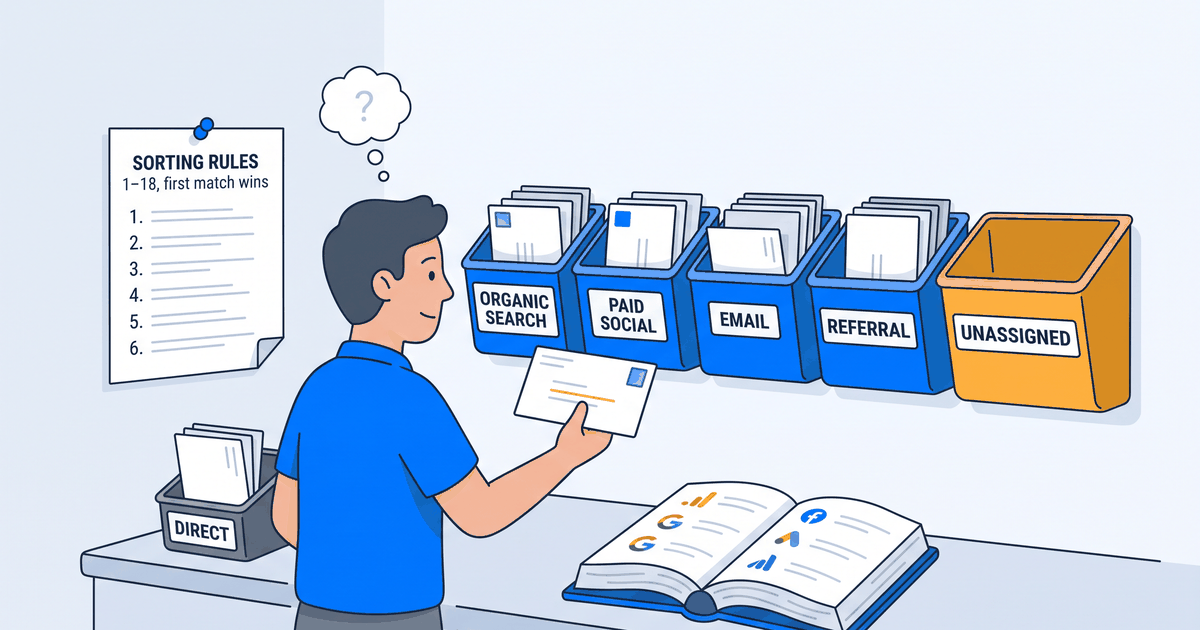
Picture a mailroom clerk. Every session that lands on your site is an envelope, and the clerk's only job is to drop it in the right bin: Organic Search, Paid Social, Email, and so on. Here is the part that changes how you read GA4: the clerk has no memory. They do not remember where yesterday's mail went. Every time you open a report, they re-sort each envelope from scratch, reading only what is printed on it and checking one reference book. The bin is the channel. It is decided fresh when you look, never written on the envelope and stored.
What the clerk reads off the envelope is only four things:
- Source: where the session came from:
google,reddit.com,(direct), or whatever you put inutm_source. - Medium: the kind of link:
organic,cpc,referral,email,(none), or yourutm_medium. - Campaign: your
utm_campaignvalue. - Source Category: the reference book, and the input nobody knows about. GA4 keeps its own lookup table (a public list of around 800 known sources) mapping domains to one of SEARCH, SOCIAL, VIDEO, or SHOPPING.
reddit.com,linkedin.com, andfacebook.comare SOCIAL.googleandbingare SEARCH.youtube.comis VIDEO. You do not set this. Google does.
That last one is why a LinkedIn click can show up as "Organic Social" even though you never tagged it: GA4 recognized the domain and slotted it into SOCIAL for you. The catch, which we get to below: this only fires if the referrer survives the trip, and plenty of sources strip it on purpose. Hold that thought.
The cheatsheet: GA4's default channel rules, in order
This is the whole engine: the clerk's checklist of bins, pinned to the wall in order. GA4 checks these rules from top to bottom for every session and stops at the first match. That ordering is the single most important thing on this page: Paid Search sits above Organic Search, so a paid Google click never falls through to organic. If a session matches nothing by rule 18, it becomes Unassigned.
Two shorthands used in the table. "~paid" means the medium matches GA4's paid regex ^(.*cp.*|ppc|retargeting|paid.*)$ (so cpc, cpm, ppc, paid-social all qualify). "Category" means the Source Category that GA4 assigned from its domain lookup.
| # | Channel | Fires when (first match wins) |
|---|---|---|
| 1 | Direct | Source = (direct) AND Medium is (not set) or (none) |
| 2 | Cross-network | Campaign contains cross-network (e.g. Performance Max, Demand Gen) |
| 3 | Paid Shopping | (Category = SHOPPING OR Campaign matches ^(.*(([^a-df-z]|^)shop|shopping)).*$) AND Medium ~paid |
| 4 | Paid Search | Category = SEARCH AND Medium ~paid |
| 5 | Paid Social | Category = SOCIAL AND Medium ~paid |
| 6 | Paid Video | Category = VIDEO AND Medium ~paid |
| 7 | Display | Medium is one of display, banner, expandable, interstitial, cpm |
| 8 | Paid Other | Medium ~paid (paid, but the category was not search, social, video, or shopping) |
| 9 | Organic Shopping | Category = SHOPPING OR Campaign matches the shopping regex |
| 10 | Organic Social | Category = SOCIAL OR Medium is one of social, social-network, social-media, sm, social network, social media |
| 11 | Organic Video | Category = VIDEO OR Medium contains video |
| 12 | Organic Search | Category = SEARCH OR Medium = organic |
| 13 | Source = email OR Medium is one of email, e-mail, e_mail, e mail | |
| 14 | Affiliates | Medium = affiliate |
| 15 | Referral | Medium is one of referral, app, link |
| 16 | Audio | Medium = audio |
| 17 | SMS | Source = sms OR Medium = sms |
| 18 | Mobile Push | Medium ends in push OR Medium contains mobile or notification OR Source = firebase |
| ELSE | Unassigned | Nothing above matched. This is the fallback, not a channel you chose. |
Read that table once and a lot of mysteries dissolve. Why did your utm_medium=newsletter email land in Unassigned? Because newsletter is not email, is not ~paid, and matches no other rule, so it falls all the way through. The engine is not clever. It is literal.
Direct vs Unassigned vs (not set): the three GA4 words everyone confuses
This is the section to bookmark. These three show up constantly, they look interchangeable, and they mean completely different things. Getting them straight is the difference between "GA4 is broken" and "oh, that is a tagging problem I can fix." Back to the mailroom: two of these are bins the clerk drops mail into, and one is a blank line on the envelope. Not the same kind of thing at all.
- Direct is a real channel. It means GA4 has no acquisition information at all for the session: Source is
(direct)and Medium is(none), so rule 1 fires. Direct is not just people typing your URL. It is every session where the referrer got stripped and no UTM survived. In the mailroom: an envelope with no return address at all, so it goes in the "no idea" bin. - Unassigned is also a real channel, but it is the fallback. GA4 did have a source and medium, but the combination matched none of the 18 rules and fell off the bottom. Unassigned is GA4 saying "I have data, I just do not have a bucket for it." In the mailroom: an envelope with a real return address, but from a place with no labeled bin, so it lands in the overflow bin at the end of the row.
- (not set) is not a channel at all. It is a blank value in one specific dimension (Source, Medium, Campaign, or Landing page) for that row. It is field-specific: you can have Source =
(not set)while other fields are populated. A session whose Source is(not set)usually rolls up into the Direct channel. In the mailroom: one line of the address form was left blank. It is a blank field, not a bin.
Direct means we know nothing. Unassigned means we know something but it matches no channel. (not set) means this one field is blank.
Keep that one-liner somewhere. When Direct spikes, you have a data-loss problem (referrers and UTMs are disappearing). When Unassigned spikes, you have a tagging problem (your UTMs use values the engine does not recognize). When you see (not set), you are looking at a blank field on a specific row, not a bucket of traffic. Three symptoms, three different fixes.
Five worked examples
Rules are abstract. Here is the engine running on real 2026 traffic. Trace each one down the table yourself.
| Scenario | What GA4 sees | Result |
|---|---|---|
| LinkedIn post, desktop web | Referrer preserved. Source = linkedin.com, Medium = referral. Category lookup: SOCIAL. | Organic Social (rule 10, on Category = SOCIAL) |
Reddit link (rel="noreferrer") | Reddit tags outbound links rel="noreferrer", so the referrer is stripped. Source = (direct), Medium = (none). | Direct (rule 1). Reddit almost always lands here, not Organic Social. |
Newsletter tagged utm_medium=newsletter | Source set, Medium = newsletter. Not email, not ~paid, no match. | Unassigned. Use utm_medium=email instead. |
| ChatGPT click, consent declined | Cookieless ping fires before consent. Source = (not set). | (not set) source, rolls up into the Direct channel. |
QR code tagged utm_medium=qr | Source set, Medium = qr. Matches no rule in the list. | Unassigned. qr is not a recognized medium. |
Notice the pattern in examples two and four: the same click can land in Direct for two totally different reasons. Sometimes the referrer was stripped (rule 1 on (direct)/(none)), sometimes a field came back blank and rolled up. Both read as "Direct" in your report. That is why Direct is not a channel you can optimize. It is a pile of things GA4 could not see.
Why so much lands in Direct, Unassigned, and (not set) in 2026
If your Direct and Unassigned buckets feel bigger than they did two years ago, they are, and it is not your fault. Two structural shifts are eating attribution data at the source.
Consent mode, denied by default. On consent-gated sites, when a visitor has not granted cookies, GA4 sends cookieless pings that drop the first-touch source. The visit still counts, but the "where from" is gone, so the session collapses toward Direct or shows up with (not set) fields. The stricter your consent banner, the fatter your Direct bucket.
Referrer stripping is everywhere. Mobile apps, AI tools, messaging apps, and any HTTPS-to-HTTP hop routinely strip the referrer before the browser ever reaches your site. No referrer and no UTM means no source, which means rule 1, which means Direct.
The rel="noreferrer" trap. Some of that stripping is deliberate. Plenty of platforms tag their outbound links with rel="noreferrer", an HTML attribute that tells the browser not to send the referrer at all. Reddit is the one that surprises people: it adds rel="noreferrer" to user-posted external links, so a click from Reddit reaches you with no source and lands in Direct, not Organic Social, even though the visitor genuinely came from social and reddit.com sits in GA4's SOCIAL category. If Reddit is a real channel for you, the only way to see it as itself is to tag the links you post with UTMs before they go up.
The AI-assistant blind spot. This one is worth calling out on its own. A growing share of high-intent traffic now arrives from ChatGPT, Claude, Perplexity, and Google's AI answers, and a lot of it lands without a referrer, hiding inside Direct. GA4 added a native "AI assistant" channel, but it only catches referrals it can see, so it undercounts. Treat any "AI traffic" number you get from GA4 as a lower bound, not a measurement. The real figure is higher, buried in Direct, and you cannot fully separate it out yet. (If AI answers are becoming a real channel for you, that is a whole discipline of its own: SEO vs. GEO vs. AEO.)
The practical fixes
You cannot control referrer stripping or a visitor's consent choice. But you control the one input that decides most of the rules: Medium. Get your UTMs right and a huge share of your Unassigned problem disappears. (Wiring GA4 up from scratch? Get the foundations right first: how to set up GA4 for SaaS.)
- Tag every link with a medium the engine actually recognizes. Use
social,email,cpc,referral. Anything creative (newsletter,qr,partner) drops straight to Unassigned. The engine does not guess; it matches exact strings. - On consent-gated sites, the UTM only survives if consent is granted before the landing
page_viewfires. If the banner blocks the tag until the user clicks accept, the first pageview (the one carrying your UTM) can be lost. Order matters. - Do not over-tag internal or organic links. Slapping UTMs on links between your own pages, or on organic posts, overwrites clean attribution with worse data.
Three more traps that are not channel-related but cost people hours:
- In Search Console, read the totals bar, not the query table. The query table is sampled and privacy-filtered, so its clicks and impressions do not add up to the real totals shown above it. The totals bar is the honest number. (More GSC gotchas: how to read Search Console data, and how it differs from GA4 in GA4 vs. Search Console.)
- GA4 dates are in the property timezone, not yours and not UTC. A "yesterday" that looks short is often just a timezone boundary.
- Do not trust the last few days. GA4 engaged-session and conversion metrics keep settling for 24 to 48 hours, and Search Console data lags roughly two to three days. Judge trends on data that has finished baking.
Frequently asked
What is the difference between Unassigned, Direct, and (not set) in GA4?
They are three different things. Direct is a real channel meaning GA4 has no acquisition info at all for the session (Source is (direct), Medium is (none)). Unassigned is also a real channel, but the fallback: GA4 had a source and medium, but the combination matched none of the 18 channel rules, so it fell off the bottom. (not set) is not a channel at all; it is a blank value in one specific field (Source, Medium, Campaign, or Landing page) for a given row. Short version: Direct means we know nothing, Unassigned means we know something that fits no channel, (not set) means one field is blank.
Why is so much of my GA4 traffic Direct or Unassigned in 2026?
Two structural shifts. Consent mode denied by default sends cookieless pings that drop the first-touch source, collapsing sessions toward Direct. And referrer stripping (mobile apps, AI tools, messaging apps, HTTPS-to-HTTP hops) removes the source before the visit reaches you. A lot of AI-assistant traffic arrives without a referrer and hides in Direct, so any "AI traffic" number GA4 gives you is a lower bound. Unassigned, separately, is usually a tagging problem: UTMs using mediums GA4 does not recognize.
How does GA4 decide the channel for a session?
It does not store one. GA4 computes sessionDefaultChannelGroup at query time from four inputs (Source, Medium, Campaign, and its own Source Category domain lookup) by running them down an ordered list of 18 rules and taking the first match. Because Paid Search sits above Organic Search, a paid Google click can never fall through to organic. If nothing matches by rule 18, the session becomes Unassigned.
What utm_medium values does GA4 actually recognize?
The exact strings in the rule table: organic, cpc (and anything matching the paid regex ^(.*cp.*|ppc|retargeting|paid.*)$), display, social, email, affiliate, referral, audio, sms, and a few variants. Creative values like newsletter, qr, and partner match nothing and drop to Unassigned. When in doubt, use the boring recognized value.
Why does my Reddit or ChatGPT traffic show up as Direct?
Because the referrer got stripped. Reddit tags its outbound links with rel="noreferrer", which tells the browser not to send a referrer, so the click reaches you with no source and rule 1 fires: Direct, not Organic Social, even though reddit.com sits in GA4's SOCIAL category. The only way to see Reddit as Reddit is to add your own UTMs to the links you post. ChatGPT clicks with consent declined behave similarly: a (not set) source that rolls up into Direct.