How AI Reads Your Website in 2026
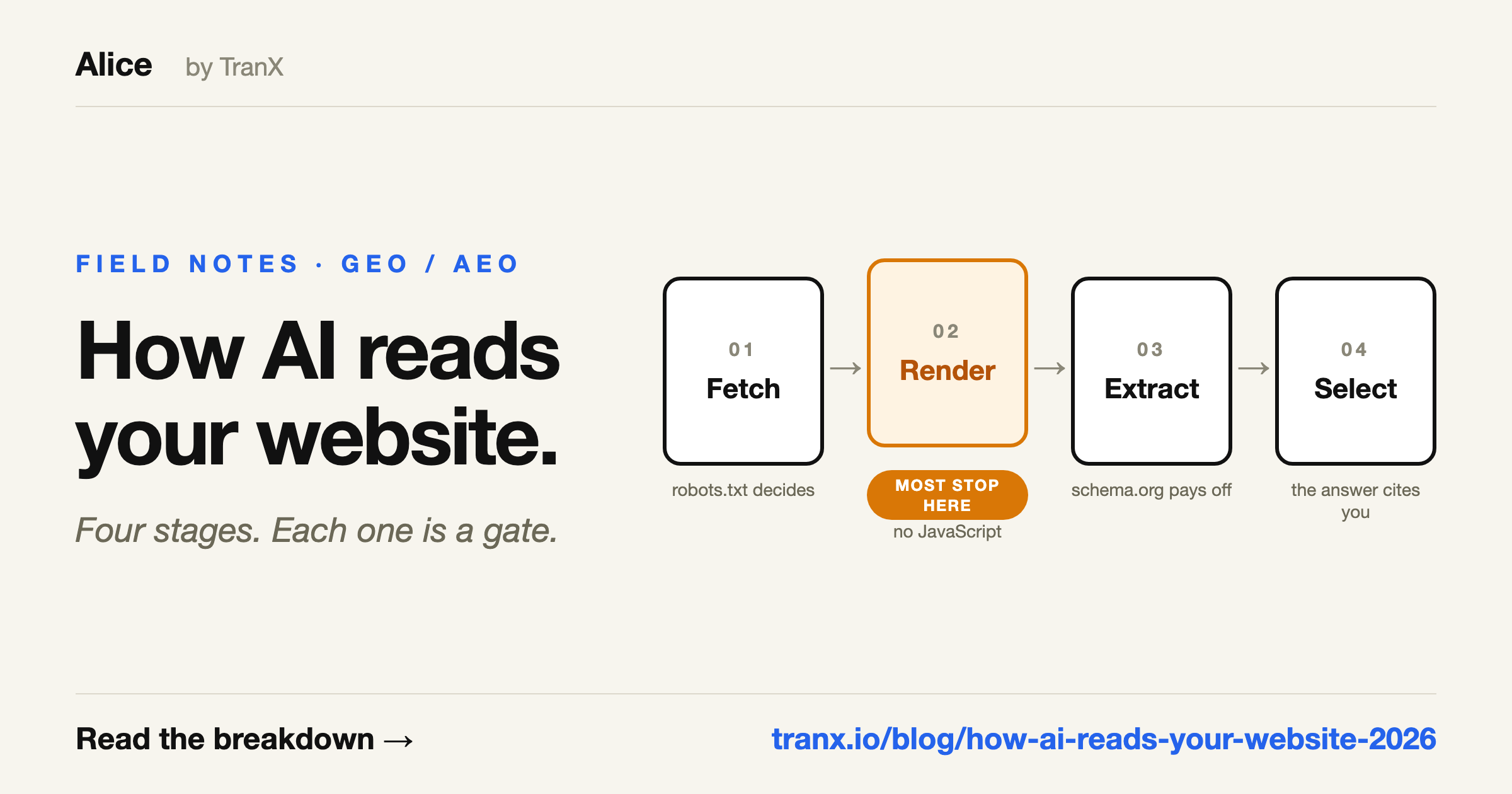
For twenty years, writing for the web meant writing for two audiences: people, and Googlebot. You mostly optimised for the second and hoped the first came along.
A third audience arrived, and it does not behave like either. When someone asks ChatGPT which tool to use, or Perplexity how a thing works, an answer engine goes and reads pages — yours possibly among them — and writes a reply. Nobody clicks. Nobody appears in your analytics. And the process by which your page did or did not make it into that answer is invisible from every dashboard you own.
This is a walkthrough of what actually happens in that process, in the order it happens, and where real sites fall out of it.
Stage one: it has to be allowed to fetch you
The first thing an AI crawler does is the least glamorous. It asks for your robots.txt and looks for a group that names it.
There are more of these crawlers than most people realise, and they are separate agents with separate names. OpenAI alone runs three — GPTBot for training, OAI-SearchBot for the search index, and ChatGPT-User for live retrieval when someone pastes a link. Anthropic runs ClaudeBot for training and Claude-SearchBot and Claude-User for search and user-requested retrieval. Perplexity runs PerplexityBot and Perplexity-User. Google runs Google-Extended, which is separate from Googlebot and controls Gemini, not search. CCBot collects for Common Crawl, which feeds a long tail of models.
With one exception — CCBot has been collecting since 2008 — every one of those names postdates 2023. A robots.txt written before then cannot mention them — and because robots.txt groups are exclusive rather than cumulative, a file that carefully allowlists the crawlers of its day will silently exclude all of these. Google keeps crawling. Rankings hold. Nothing anywhere reports a problem. We wrote up a founder who did this for two years without noticing.
Blocking these crawlers is a legitimate decision — plenty of publishers make it on purpose. The problem is making it by accident, in 2019, and finding out in 2027.
One honest caveat: robots.txt is where this check starts, not where it ends. A CDN or firewall can refuse the same crawlers at the door regardless of what the file says — Cloudflare now blocks known AI crawlers by default on new sites — and no robots.txt check, ours included, can see that layer. If your file says yes and you want certainty, your server logs are the ground truth: either GPTBot shows up in them or it does not.
Stage two: it has to be able to read what it fetched
Say the crawler is allowed in. It receives your HTML. Here is where a large number of otherwise healthy sites quietly fail.
Googlebot has run JavaScript for years. It fetches your page, queues it for rendering, executes the scripts, and indexes whatever the browser would have shown. Most AI crawlers do not do this. They take the HTML your server returned and parse it as text. That is measured, not folklore: Vercel and MERJ analysed AI crawler traffic across Vercel’s network — GPTBot alone made 569 million requests in a single month — and found the crawlers sometimes fetch JavaScript files, but never execute them.
If your site is a React, Vue, or Angular app that renders on the client, the HTML your server returns is close to empty — a title, a <div id="root">, and a script tag. A person sees a full page. Googlebot sees a full page. The crawler that decides whether ChatGPT can quote your pricing sees four words and an empty div.
In October 2026 we tested this on a site built for the purpose. Four of five AI fetchers saw the empty page. The ChatGPT app was the exception: it downloaded the JavaScript file and read the facts out of the code. The full test is here.
You can check this yourself in about ten seconds, without any tooling. Fetch your own page the way a crawler would and count what comes back:
curl -s https://yoursite.com/pricing | wc -wIf that number is in the tens rather than the hundreds, your content does not exist as far as most answer engines are concerned. The reverse is not quite a guarantee — the count includes markup and inline scripts, so a large number can still be noise. For certainty, grep the output for a sentence you can read on the page: if your own copy is not in the response, no crawler received it either. The fix is server-side rendering, static generation, or prerendering for bots — which framework you use decides which. This is not an SEO nicety; it is the difference between having content and not having it.
Stage three: it has to find something worth extracting
A model that can read your page still has to decide what in it is a fact, what is a claim, and who is making it. Prose alone makes that hard. Structure makes it easy.
This is what schema.org markup is for, and it matters more for answer engines than it ever did for search. An Organization block says who you are. Product and Offer say what you sell and for how much. FAQPage hands over question-and-answer pairs already separated. Article attributes a piece of writing to an author and a date. Without them, a model reading your pricing page has to infer from a wall of text that $49 is a price, that it is monthly, and that it belongs to you rather than the competitor you mentioned two paragraphs earlier.
The same logic applies to ordinary writing hygiene, which turns out to matter more than it used to. Headings that describe their section. Answers that appear directly under the question rather than four paragraphs later. Claims with numbers attached. A model lifting a passage into an answer wants a passage that survives being lifted.
You will also see /llms.txt recommended around this stage. It is a proposed convention for handing models a curated map of your site. We check for it and we will tell you if it is missing — but no major engine has publicly committed to honouring it, and we would not put it ahead of anything above. Add it if it costs you ten minutes. Do not add it instead of server-side rendering.
Stage four: it has to pick you
Everything so far has been about eligibility. This last stage is competition, and it works differently from ranking.
A search engine returns ten links and lets the user choose. An answer engine synthesises one reply and cites a handful of sources — often three or four. There is no page two. Being the eleventh-best source for a query is worth roughly what being the hundredth is worth, which is a harsher distribution than search has ever had.
It also does not map cleanly onto rank. Sites that do not rank in the top ten get cited in AI answers regularly, because retrieval is matching a passage to a question rather than a domain to a keyword. We looked at what that does to click-through on the Google side separately. If you want the vocabulary for all of this — what separates GEO from AEO from plain SEO — that is its own post.
What you can measure, and what you cannot
Here is the distinction that saves the most wasted effort, and the one most tools in this category blur on purpose.
Stages one through three are capability. They are deterministic, they are entirely yours to fix, and you can verify them in seconds. Either GPTBot is allowed or it is not. Either your H1 is in the raw HTML or it is not.
Stage four is outcome. Measuring it means asking the engines your actual buyer questions, repeatedly, over weeks, and counting how often you are named. It moves. It differs by engine. It is only partly in your control.
Be suspicious of any free tool that shows you an “AI visibility score” out of 100 in thirty seconds and implies it is measuring the second thing. It is not. It cannot be. Thirty seconds buys you a capability check — which is genuinely worth having, because capability is a precondition. Fixing it does not guarantee you get cited. Not fixing it guarantees you do not.
Why not just ask ChatGPT to check this?
Fair question, and the answer is not “because we sell a scanner”. Start with what the assistants genuinely can do, because it is more than people assume.
Stage one, they handle fine. Point any assistant with web access at your robots.txt and ask which AI crawlers are allowed. We tried it. It fetched the file, listed every user-agent group, and got every verdict right. If crawler access is all you want to know, you do not need a tool for it — and free single-purpose checkers exist for exactly that.
Stages two and three are where it breaks, and it breaks in the worst available way. We pointed the same assistant at this very page and asked it to report only what it could verify. It told us the page contains no schema.org structured data. This page carries two blocks — a WebApplication and an FAQPage. The answer was confident, specific, and wrong.
That is not carelessness. It is the input. Assistants do not receive raw HTML — the fetch layer converts the page to clean text or markdown before the model sees anything, and that conversion strips scripts, flattens structure, and discards JSON-LD. Asking whether your H1 is in the server response is asking about a property of a document the model was never handed. It cannot check. It has no way to know it cannot check. So it infers from what it did get, and the inference comes back phrased like a finding.
Asked for a raw-HTML word count, the same assistant did the right thing and refused — “the content provided appears to be already-processed markup”. Asked about the H1, it hedged: “this appears to be rendered server-side.” It happened to be right about us. It would have said the same about a React app that ships an empty div, because from where it was standing the two look identical.
Which is the whole post again, one level up: a check that looks like it worked. What stage two actually requires is something that fetches the bytes your server sent, refuses to execute anything, counts what is really there, and reports only what it measured. That is a different kind of tool, not a better prompt.
Row by row, for the four checks this post has been about:
| Check | Asking ChatGPT or Claude | Alice’s free scan |
|---|---|---|
| AI crawler access in robots.txt | Yes — fetches and parses it correctly | Yes |
| /llms.txt present | Yes — it is just a file | Yes |
| Words in the raw HTML | No — never receives raw HTML | Yes |
| Server-rendered vs client-rendered | Infers, and sounds certain either way | Yes |
| schema.org blocks present | Unreliable — JSON-LD is stripped in conversion | Yes |
| Says so when it cannot verify something | Sometimes | Yes |
| Same answer if you ask twice | Not guaranteed | Yes |
| Whether AI answers actually cite you | No | Not in 30 seconds — Alice’s paid plan tracks this over time |
Two rows are ties, and the last row no thirty-second check can win — citation tracking is repeated probing of live answers over weeks, which is what Alice’s paid plans do, starting with Google’s AI Overviews on your top buyer queries. If your question is only about crawler access, an assistant answers it as well as we do and costs you one sentence — go and ask it. The gap opens on the rows where the raw bytes matter, and it is widest on the second-to-last row, because a tool that cannot tell you when it does not know is worse than no tool at all.
The ten-minute version
If you do nothing else, do these four things in this order. They are ordered by how often they are broken and how cheap they are to fix, not by how interesting they are.
- Open your robots.txt and look for a group that names GPTBot, OAI-SearchBot, ClaudeBot, PerplexityBot and Google-Extended. If your file predates 2023, assume it excludes them until proven otherwise.
- Curl your most important page and count the words. Tens means your content is client-rendered and effectively invisible.
- Check your structured data on the pages that answer questions — pricing, docs, comparisons. Organization at minimum; FAQPage where you actually have questions and answers.
- Then, and only then, start tracking whether anything cites you. Tracking citations while GPTBot is blocked is measuring a race you have not entered.
The first three are a free scan. Ours runs all of them against a live URL in about thirty seconds and reports each finding graded, with the specific fix. No sign-up, and it will tell you plainly when something is fine — a tool that finds a crisis on every site is not a tool, it is a funnel.
The fourth one is the long game, and it is where the real work is. But it is the fourth one for a reason.
Find out which stage your site fails at
Alice checks crawler access, server-rendered content, schema markup and /llms.txt against your live URL in about 30 seconds — each finding graded, with the specific fix. No sign-up.
Try Alice Free